

Opening 4 October 2026
For tradespeople, video creators, designers and web developers
Send a quote
in 3 minutes.
Go from signing up to sending your first quote within 3 minutes.
Describe the job and AI fills in a draft quote. Check it and send the link. Your customer opens it and approves — no account needed.
Free to start.
20 quotes sent a month, no card. Quote, customer and job lists show the last two months. Paid pricing for this market is still being set.
See pricingAndroid · iPhone apps in development · About the apps
Your first quote
Write one line, and the quote takes shape
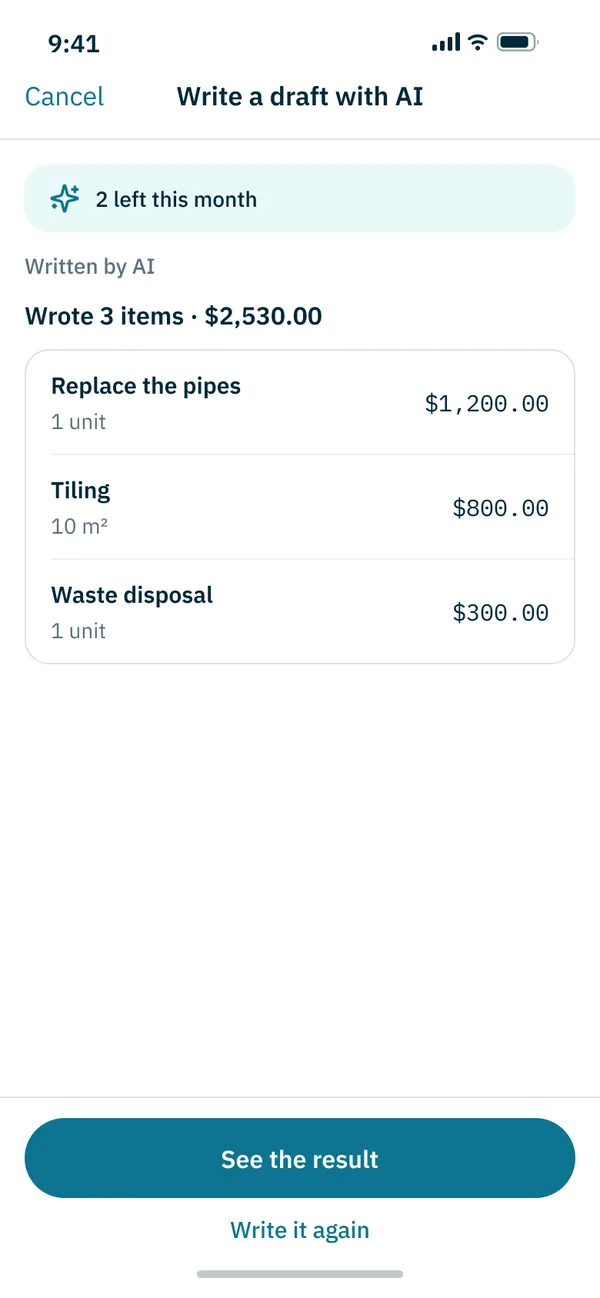
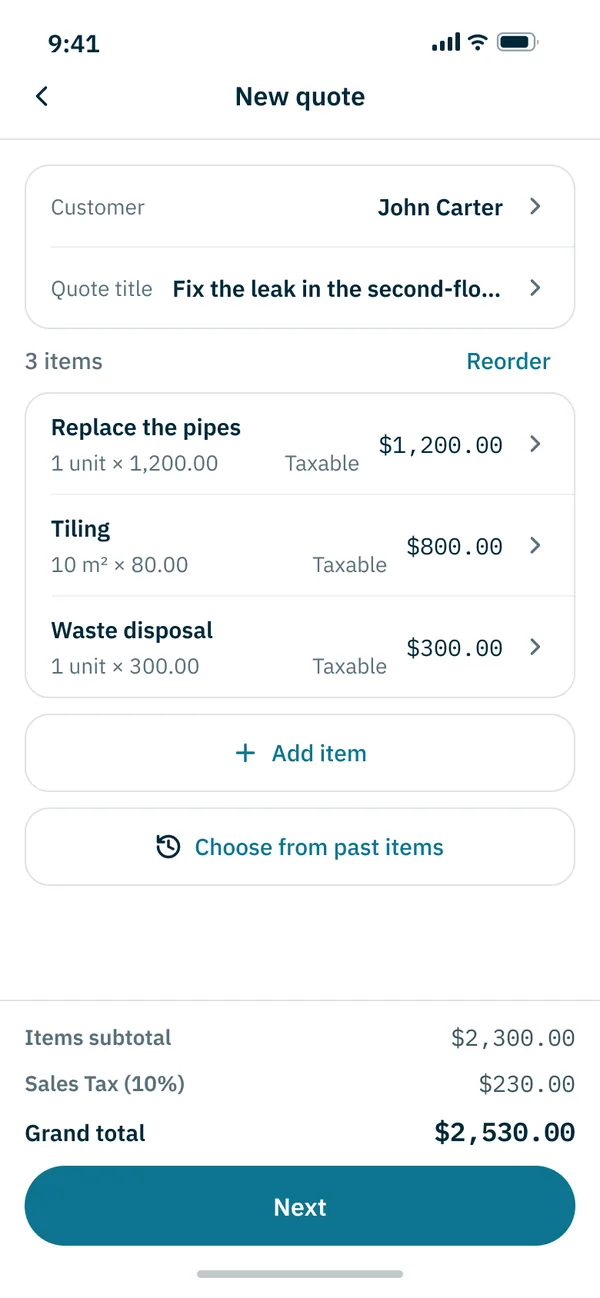
Describe the job in one line and AI fills in items, quantities and estimated prices. Check them, fix what you need, and send.
An example for illustration. AI prices are estimates — check and correct them before you send. AI drafts: 5 a month per organization. You can also start from an example for your trade.
Customer link
Your customer only needs one link
Your customer opens the link with no app and no account, reviews the quote and approves it. You see when it was opened and when it was approved. A sent quote locks; change it and send again, and it goes out as a new version so the figures they saw stay intact.
Send the link by email or with your phone’s share menu. Talk the work through with your customer by phone, as you always have.
More on sending and versionsWhat your customer sees
Quote
Unit 302 — supply line replacement
- Replace corroded supply lines
- 1 job
- $450.00
- Materials (copper, fittings)
- 1 job
- $120.00
- Subtotal
- $570.00
- Tax
- $57.00
- Total
- $627.00
Your customer installs nothing and signs up for nothing. They open the link and see a screen like this. It is an example, so the buttons do nothing.
Reuse past quotes
Your next quote gets help from your last job
Find what you quoted for similar work, and for how much, and bring its items into the new quote.
Past quote · example
Café website
- Planning & design
- 1 job
- $1,500.00
- Responsive pages
- 5 pages
- $750.00
- Admin panel
- 1 job
- $400.00
- Subtotal
- $2,650.00
Copy from another quote
New quote · example
Bakery website
- Planning & design
- 1 job
- $1,500.00
- Responsive pages
- 7 pages
- $1,050.00
- Admin panel
- 1 job
- $400.00
- Subtotal
- $2,950.00
Find past work
Search your quotes and jobs, and see the quotes you have sent a customer on their page.
Bring in the items
Add all the line items from a similar quote, or just the lines you need. The original quote stays unchanged.
Adjust it for this job
Enter the customer and terms for this request, change quantities and prices, and send.
On the free plan, your quote, customer and job lists show the last two months. Older records are not deleted — they just don’t appear in the lists. Paid plans are not available yet.
More on reusing quotesAfter you send
After the quote goes out, you can see what today needs
See your visits, money to collect and customer replies on one Today screen. Turn approved quotes into jobs to keep managing the work.
Jobs
Turn an approved quote into a job, and keep the schedule, visits and photos in one place.
Reports
When the work is done, keep the photos and notes as a report and send it straight to the customer.
Statements
Make the statement from the job and send it the same way as the quote. Nothing to retype.
Unpaid balance
Note the deposit, progress payment and final payment, and what is still unpaid is visible at a glance.
Today · example
- Visit
- 2:00 pm · Unit 302
- To collect
- Final payment $700.00
- Reply
- The café promo video quote was approved
Apps
Wherever you work, your records follow
Tidy things up on a computer at your desk, and check quotes, photos and schedules on your phone when you are out on a job or a shoot.
Web (phone · computer)
From 4 October
After launch, use it right in your browser. On your phone, add it to the home screen to open it like an app.
Android
In development
We are preparing the Google Play app. Once there is a release date, it will be on this site.
iPhone
In development
We are preparing the App Store app. Once there is a release date, it will be on this site.
Start free, from your very first quote
The free plan costs nothing, needs no card and has no time limit.
- 20 quotes sent a month
- 5 AI drafts a month
- Quote, customer and job lists: last two months
Records older than two months are not deleted — they just don’t appear in the lists. Paid plans are not available yet.
Your business details, your tax rate, your currency. You set them once, and every quote and PDF carries them.
Hiring someone for a job? You can use it too. Find businesses near you and get in touch directly, or send a quote request and compare the quotes side by side.
See pricing detailsMake your next quote with QUOTIMA
Start from an example or an AI draft the first time. When similar work comes back, start from the past quote.
No card required. The Free plan costs nothing. Twenty quotes a month.
Android · iPhone apps in development · About the apps